Preview members can now download the newest update filled with new features such as Clubs and LFG (Looking For Group) which is known to be very helpful in certain games like Destiny, Halo and Call of Duty. It’s also arriving Xbox app on iOS, Android, and Windows 10 devices very soon. Arena feature is not present in this current build but Microsoft is going to talk about it in the coming weeks so be sure to stick your head on majornelson.com / news.xbox.com for breaking news.
Clubs on Xbox Live
“As a Club member, you’ll be able to set up parties, play games, share content, and easily communicate using voice and text chat with the Club across Xbox One and the Xbox app. You can search for Clubs (or create your own) in the Community tab on Xbox One and the Clubs section on other devices, and Clubs associated with a game will be accessible in the title’s Game Hub. As a Club admin, you’ll have the tools to ensure that everyone is having a great time and help create a lively and inclusive environment. Reserve your Club name today as no two can be the same!”
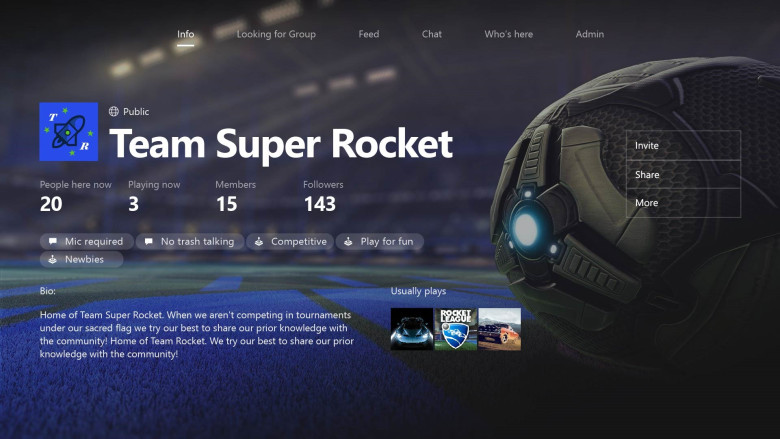
Looking for Group (LFG) on Xbox Live
“LFG helps you quickly find other players that you want to game with. It’s like posting a gaming “want-ad” to the Xbox community. Need to do daily quests or on the hunt for certain achievements? We have you covered – just create a LFG post. You’ll be able to add certain requirements to make sure that you’re finding the right gamers. You can specify the game, the game mode, how many people you need, rules like no trash talking or casual friendly, and any other in-game requirements like level, gear or character type.
A quick primer on how LFG works: gamers can browse open LFGs and request to join the ones that they’re interested in. The LFG host chooses from the list of gamers who have expressed interest and, once the group is full or the host is ready, the host can quickly get those people into party chat and start playing. Quick, easy, and simple. Whether you’re playing a FPS on Xbox One or your favorite PC title, you can quickly find other gamers to play with on Xbox Live. As with Clubs, Preview members will start seeing LFG on Xbox One today and on the Xbox app in the coming weeks.”
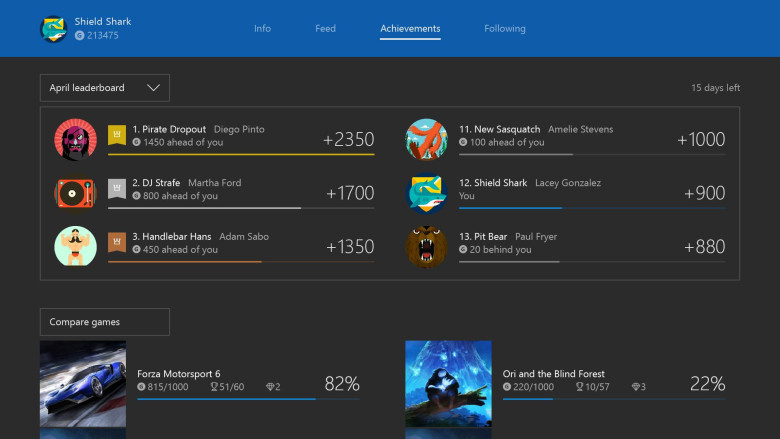
Gamerscore Leaderboard
“The Gamerscore Leaderboard on Xbox One and the Xbox app on Windows 10 devices is faster and more reliable. The Leaderboard also now resets at the beginning of each month instead of displaying results for a 30-day rolling period, meaning you and your friends will have a clean slate to compete against one another at the start of each month! You can keep an eye on the Gamerscore Leaderboard through the Achievement tab or by using the guide.”
For more information be sure to head to majornelson’s blog and read all about the new stuff coming to Xbox One.

- Uncategorized
 Mini Review: Shadow Tactics: Blades of the Shogun (Switch 2 Edition)
April 6, 2026
- Uncategorized
 Nintendo announces Treehouse: Live featuring Pokemon Pokopia and Super Mario Bros Wonder
February 23, 2026
- Uncategorized
 Sonic Racing: CrossWorlds Nintendo Switch 2 Edition releases December 4
November 6, 2025


- UncategorizedMini Review: Shadow Tactics: Blades of the Shogun (Switch 2 Edition)
April 6, 2026
- UncategorizedNintendo announces Treehouse: Live featuring Pokemon Pokopia and Super Mario Bros Wonder
February 23, 2026
- UncategorizedSonic Racing: CrossWorlds Nintendo Switch 2 Edition releases December 4
November 6, 2025
- Uncategorized
 Review: Yooka-Replaylee
October 30, 2025