


In recent time, Microsoft has continued to propel its Xbox platform beyond console – that is no secret. Even part of the new ‘This Is An Xbox’ campaign online, devices such as smartphones & Meta Quest are now technically Xbox by its own definition. Additionally, the firm has continued to invest in bringing new technologies to its platforms. Most recently, it revealed purchase library will be entering beta for Xbox Cloud Gaming as of this past week.
Even more, Microsoft has also invested greatly into artificial intelligence. Previously, it was reported that a new Xbox chatbot has been in prototype for some time internally at Microsoft. Atop of that, Microsoft’s own Copilot AI bot has also been seen utilized for gaming. The firm presented as such with assistance for playing Minecraft at a keynote held earlier this spring.
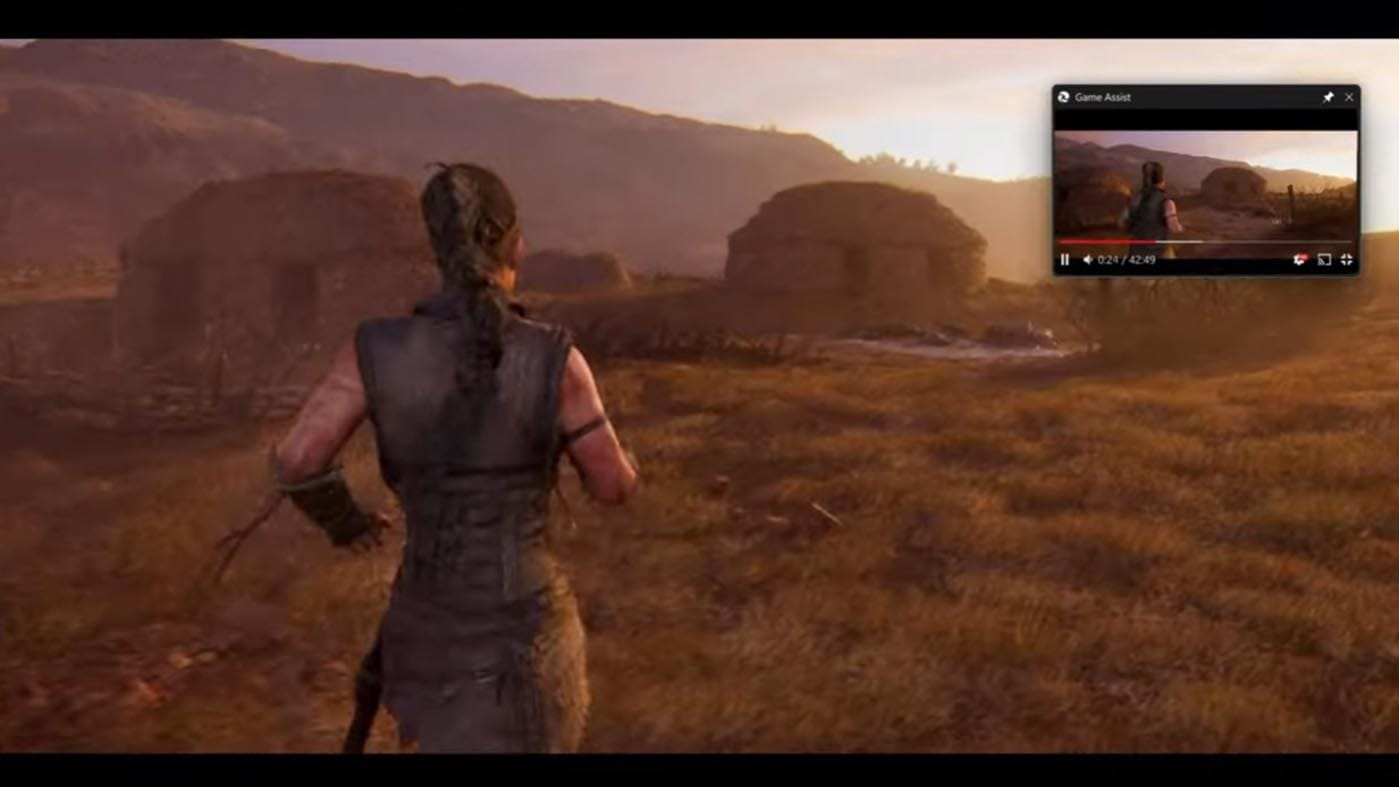
Now in a new blog post from Microsoft, the firm reveals that a new Game Assist mode is entering testing on Microsoft Edge. The browser on PC will now enable a new feature which quick links to aiding in playing games or even to hunt for collectible alongside other achievements. Games confirmed for this includes Baldur’s Gate 3, Diablo IV, Fortnite, Hellblade II: Senua’s Saga, League of Legends, Minecraft, Overwatch 2, Roblox, and Valorant.
Game Assist is a special version of Microsoft Edge that’s optimized for PC gaming and can appear on top of your game in Game Bar. It’s game-aware and will suggest tips and guides for what you’re playing. It also shares the same browser data with Edge on your PC so the information you care about is always accessible while you play—including your favorites, history, cookies, form fills, and more.
This means you don’t need to log into sites again, and it’s easy to get to what you care about. You can even quickly access your favorite services like Discord, Twitch, Spotify, or any other page or site in the sidebar. And, like other Game Bar widgets, you can pin Game Assist above your game so you can reference a guide or watch a video while you play.
“Game Assist helps you get the most out of your game by bringing the full power of the web to Game Bar. Simply press Win+G at any time to open the Game Bar overlay. The game is always visible in the background for peace of mind, making it easy to quickly glance at a guide and then continue on with your game. Game Assist is designed to take up as little screen real estate as possible, but you can resize or move it to fit your needs.”
The blog continues: “Game Assist shares the same browser profile as Edge on PC, so you always have access to your data. Your favorites and history will appear in the address bar, saved passwords and form fills can be quickly entered on pages, and you’ll already be logged into the same sites as on PC. We’ve also optimized Game Assist to display a unique set of gaming tabs and sidebar apps for a gaming-centric experience and the best performance.”
Are you interested in this new tool coming to Microsoft Edge?
Source: Microsoft

- News
 LEGO Batman: Legacy of the Dark Knight comes to Switch 2 on September 18
30 minutes ago
- News
 Pokemon Champions releases June 17 for iOS and Android
1 hour ago
- News
 Rayman Legends Retold releases October 1 for PS5, Switch 2, Xbox Series, and PC
12 hours ago
- News
 The Lost Wild Confirmed For 2027, Coming To PlayStation 5 & PC
13 hours ago
