


In discussion with cloud gaming in recent months, Microsoft has proven to be a forerunner for the new virtual platform alongside Google’s up and coming Stadia. While not abandoning the retail hardware for streaming, Project xCloud has illustrated to be a fresh step into the future of interactive entertainment. Instead, Xbox users can utilize their own devices to play games anywhere on the go without needing to purchase a handheld or being restricted from their home.
Given the sense for how the streaming initiative works on the surface, Microsoft recommends users use a wireless controller with BlueTooth compatibility. The firm is even partnering with a product manufacturer, 8Bitdo, to create a gamepad created for on-the-go convenience and easy to carry around.
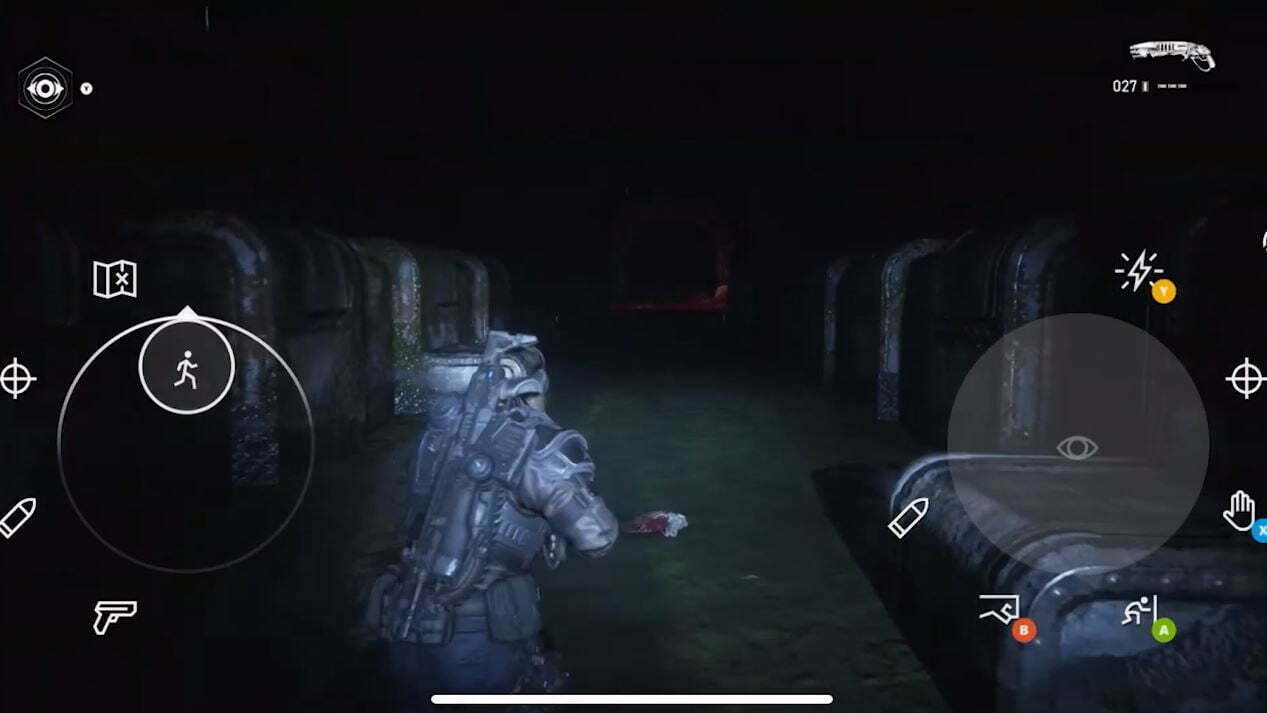
However, the firm did not truly expand on the more traditional control scheme for mobile gaming: touch screen. That being said, developer The Coalition – one of the teams responsible for the creation of the touch screen interface for Project xCloud – has presented just some aspects of how the peripheral operates live. During a Microsoft Game Stack Livestream, the studio issued the glimpse with some scenes from Gears 5.
When we first started talking about this, we were going a little over complicated because we weren’t sure what we needed to do. As we started to dig into it, we realized the best thing for us to do is to treat this as a different input device like we already support keyboard and mouse, controller, and we have customized controls and remapping.
And so for us what we realized is that, the best thing to do was to basically just bring this in as another one of those control schemes. So we can take advantage of all of our other , you know the tutorials, our button hints, and all the things that were already in our game. We just then were able to kind of, take a little bit of the art that we were using in the tack, integrated in. So we have custom layouts for basically anything you can do in the game.
Jarret Bradley, The Coalition Senior Gameplay Producer
Elaborating further on the interface for Project xCloud, the team explains that depending on your perspective or what specific action you are performing in the game will prompt a selection of respectively appropriate controls for the user. Depending on the game, this instance being Gears 5, the controls itself will operate to how it already is implemented for a regular controller. Additionally, the interface will be configured to reflect unique actions in games like Gears of War’s timed reloading.
Then looking at the scenes in Gears 5 where you control the skiff, the controls will be minimized since less actions are available to perform – simply leaving prompts to controls the vessel and rotate the camera. Even in cinematic moments of the game, the controls will temporarily disappear to watch the scene without the transparent buttons blocking the screen.
One added feature that stands out with Project xCloud is gyro controls for titles that did not support the feature before. After time, The Coalition added support for the feature noting that the device will support gyro-based turning with a smart phone. “Because, you know playing a third-person shooter right, like, you got our ADS you’re in, but those fine tune little aim, you know when you’re playing on the network and you’re using the look controls, it can be a little challenging to get those fine tunes in.
So with the ability to use your phone to get those gyro controls it just, it feels like a natural experience.” Looking ahead, the firm spares that developing new projects will also keep this new approach to control schemes for Project xCloud in mind as it can continued to be expanded further with more support presumed to be added later on.
This week, Microsoft announced that the streaming platform for mobile devices will be shipping to Android-based smart phones and tablets next month on September 15. The cloud-based platform will receive 100+ supported titles via Xbox Game Pass Ultimate. You can read the full report by heading here.
What is your thoughts on the touch screen interface for Project xCloud?

- News
 LEGO Batman: Legacy of the Dark Knight comes to Switch 2 on September 18
Yesterday
- News
 Pokemon Champions releases June 17 for iOS and Android
Yesterday
- News
 Rayman Legends Retold releases October 1 for PS5, Switch 2, Xbox Series, and PC
Yesterday
- News
 The Lost Wild Confirmed For 2027, Coming To PlayStation 5 & PC
Yesterday
